Ops, Calls, and Traces create the foundation of W&B Weave and are used in most of its features. They are the organizational components you use to trace data as it flows through your application. Having a strong understanding of them can help you organize how to best capture your application’s interactions and data. This article uses the following example code to illustrate the concepts presented:
weave_concepts.py
import weave

weave.init('<your-test-team/your-project-name>')

@weave.op(name="parentFunction", color="blue", kind="agent")
def parentFunction():

    @weave.op(name="llmCall", color="purple", kind="llm")
    def llmCall():
        return "This produces a child-level Call."

    @weave.op(name="nestedToolCall", color="red", kind="tool")
    def nestedToolCall():

        @weave.op(name="deepNestedToolCall", color="red", kind="tool")
        def deepNestedToolCall():
            return "This function produces deeply nested child-level Call."

        print(deepNestedToolCall())    
        return "This function produces a nested Call."

    print(llmCall())
    print(nestedToolCall())
    return "This function produces a parent-level call."

print(parentFunction())
This example illustrates how to capture and label function executions in your code using Weave. It contains a parent function (parentFunction) with two child functions (llmCall and nestedToolCall, one of which contains a deeply nested function (deepNestedToolCall).

When to use autopatching

Weave automatically integrates with many popular LLM providers and frameworks. When using a supported integration, you can call weave.init('<your-test-team/your-project-name>') in your code to automatically capture your LLM’s input and output. However, this method only captures data about top-level interactions with supported LLMs. If you want to trace specific, arbitrary functions in your application, you should use Ops.

Use Ops

An Op is a versioned, tracked function. When you decorate a function with @weave.op() (Python) or wrap it with weave.op() (TypeScript), Weave automatically captures its code, inputs, outputs, and execution metadata. The resulting captured data are Calls. You can apply Ops to any arbitrary function in your application. In the sample code, all of the functions are decorated with weave.op(). For example, the Op for the parentFunction() instructs Weave to capture data about it during its execution.
weave_concepts.py
@weave.op(name="parentFunction", color="blue", kind="agent")
def parentFunction():
    ...
It also uses the attribute arguments to apply a name, color, and kind to the resulting Call object to better define the resulting data. Running the code produces and logs a Call to Weave for each function.

Understand Calls

A Call is a logged execution of a function decorated by an Op. Each time a decorated function is executed, Weave creates an immutable Call object that captures the function’s:
  • Input arguments
  • Output value
  • Timing and latency
  • Parent-child relationships (for nested calls)
  • Any errors that occurred
Calls are similar to spans in the OpenTelemetry data model. A Call can:
  • Belong to a Trace (a collection of calls in the same execution context)
  • Have parent and child Calls, forming a tree structure
The example code produces the following Call object:
Call(_op_name=<Future state=running>,
     trace_id='0192abc0-0000-7000-a000-000000000000',
     project_id='your-team/your-project',
     parent_id=None,
     inputs={},
     id='0192abc0-0001-7000-a000-000000000001',
     output='This function produces a parent-level call.',
     exception=None,
     summary={'status_counts': {<TraceStatus.ERROR: 'error'>: 0,
                                <TraceStatus.SUCCESS: 'success'>: 4}},
     _display_name=None,
     attributes=AttributesDict({'weave': {'kind': 'agent', 'color': 'blue', 'python': {'type': 'function'}, 'client_version': '0.52.33', 'source': 'python-sdk', 'os_name': 'Darwin', ...}}),
     started_at=datetime.datetime(2026, 3, 24, 19, 49, 8, 351371, tzinfo=datetime.timezone.utc),
     ended_at=datetime.datetime(2026, 3, 24, 19, 49, 8, 355275, tzinfo=datetime.timezone.utc),
     deleted_at=None,
     thread_id=None,
     turn_id=None,
     wb_run_id=None,
     wb_run_step=None,
     wb_run_step_end=None,
     _children=[Call(_op_name=<Future state=running>,
                     trace_id='0192abc0-0000-7000-a000-000000000000',
                     project_id='your-team/your-project',
                     parent_id='0192abc0-0001-7000-a000-000000000001',
                     inputs={},
                     id='0192abc0-0002-7000-a000-000000000002',
                     output='This produces a child-level Call.',
                     exception=None,
                     summary={'status_counts': {<TraceStatus.ERROR: 'error'>: 0,
                                                <TraceStatus.SUCCESS: 'success'>: 1}},
                     _display_name=None,
                     attributes=AttributesDict({'weave': {'kind': 'llm', 'color': 'purple', 'python': {'type': 'function'}, 'client_version': '0.52.33', 'source': 'python-sdk', 'os_name': 'Darwin', ...}}),
                     started_at=datetime.datetime(2026, 3, 24, 19, 49, 8, 353172, tzinfo=datetime.timezone.utc),
                     ended_at=datetime.datetime(2026, 3, 24, 19, 49, 8, 353978, tzinfo=datetime.timezone.utc),
                     deleted_at=None,
                     thread_id=None,
                     turn_id=None,
                     wb_run_id=None,
                     wb_run_step=None,
                     wb_run_step_end=None,
                     _children=[],
                     _feedback=None,
                     storage_size_bytes=None,
                     total_storage_size_bytes=None),
                Call(_op_name=<Future state=pending>,
                     trace_id='0192abc0-0000-7000-a000-000000000000',
                     project_id='your-team/your-project',
                     parent_id='0192abc0-0001-7000-a000-000000000001',
                     inputs={},
                     id='0192abc0-0003-7000-a000-000000000003',
                     output='This function produces a nested Call.',
                     exception=None,
                     summary={'status_counts': {<TraceStatus.ERROR: 'error'>: 0,
                                                <TraceStatus.SUCCESS: 'success'>: 2}},
                     _display_name=None,
                     attributes=AttributesDict({'weave': {'kind': 'tool', 'color': 'red', 'python': {'type': 'function'}, 'client_version': '0.52.33', 'source': 'python-sdk', 'os_name': 'Darwin', ...}}),
                     started_at=datetime.datetime(2026, 3, 24, 19, 49, 8, 354866, tzinfo=datetime.timezone.utc),
                     ended_at=datetime.datetime(2026, 3, 24, 19, 49, 8, 355143, tzinfo=datetime.timezone.utc),
                     deleted_at=None,
                     thread_id=None,
                     turn_id=None,
                     wb_run_id=None,
                     wb_run_step=None,
                     wb_run_step_end=None,
                     _children=[Call(_op_name=<Future state=pending>,
                                     trace_id='0192abc0-0000-7000-a000-000000000000',
                                     project_id='your-team/your-project',
                                     parent_id='0192abc0-0003-7000-a000-000000000003',
                                     inputs={},
                                     id='0192abc0-0004-7000-a000-000000000004',
                                     output='This function produces a deeply '
                                            'nested child-level Call.',
                                     exception=None,
                                     summary={...},
                                     _display_name=None,
                                     attributes=AttributesDict({'weave': {'kind': 'tool', 'color': 'red', 'python': {'type': 'function'}, 'client_version': '0.52.33', 'source': 'python-sdk', 'os_name': 'Darwin', ...}}),
                                     started_at=datetime.datetime(2026, 3, 24, 19, 49, 8, 355051, tzinfo=datetime.timezone.utc),
                                     ended_at=datetime.datetime(2026, 3, 24, 19, 49, 8, 355077, tzinfo=datetime.timezone.utc),
                                     deleted_at=None,
                                     thread_id=None,
                                     turn_id=None,
                                     wb_run_id=None,
                                     wb_run_step=None,
                                     wb_run_step_end=None,
                                     _children=[],
                                     _feedback=None,
                                     storage_size_bytes=None,
                                     total_storage_size_bytes=None)],
                     _feedback=None,
                     storage_size_bytes=None,
                     total_storage_size_bytes=None)],
     _feedback=None,
     storage_size_bytes=None,
     total_storage_size_bytes=None)
The example Call object not only contains the data captured for the parentFunction, but also contains the data for the function’s child functions. This results in a data structure called a Trace tree. You can retrieve and view the sample code’s Call object by appending the following lines to the example:
from pprint import pprint

result, call = parentFunction.call()
print(result)
pprint(call, width=80, depth=5)

Understand Traces

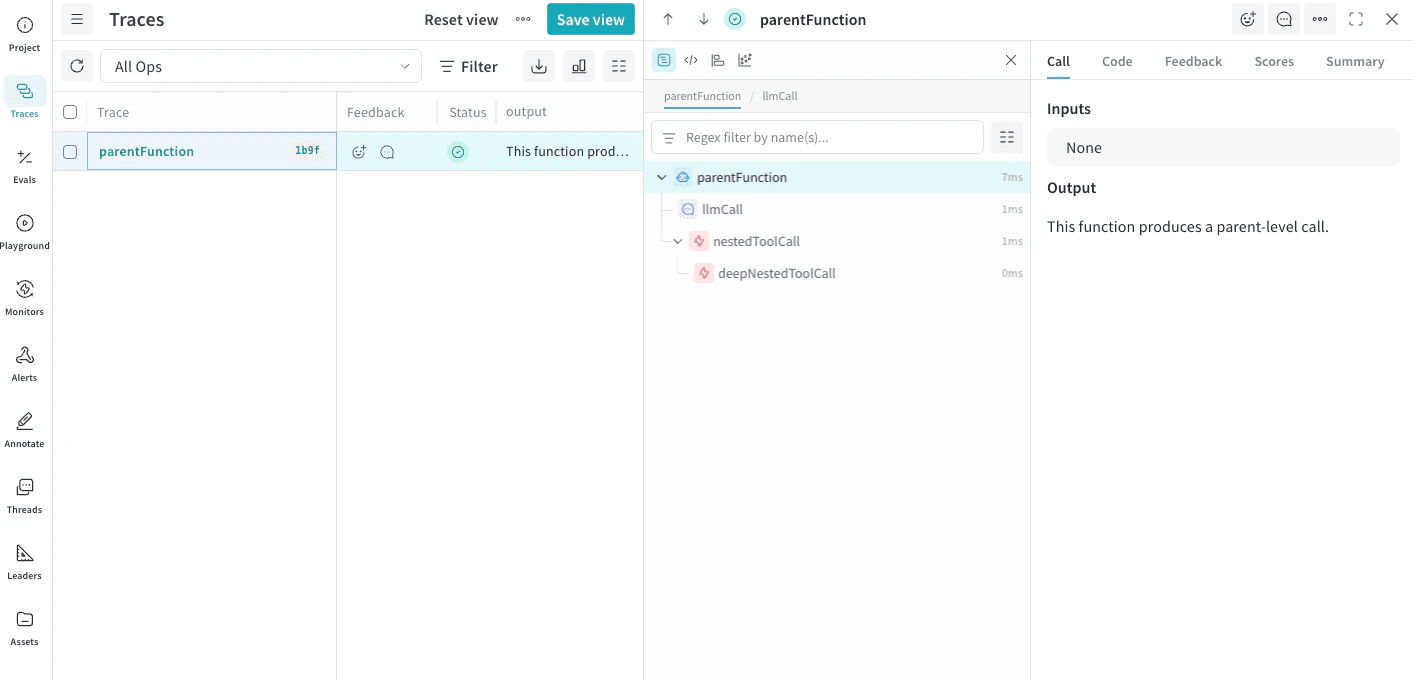
Traces are full trees of Calls that share the same execution context. Each Trace contains an ID (trace_id) you can use to retrieve the entire tree of Calls. Retrieving Call information using the Call’s id only returns data about the specified Call and none of its child Calls. The sample code produces a Trace tree with the following structure:
Trace (trace_id: abc-123)
├── Call: parentFunction      ← root call
│   ├── Call: llmCall         ← child call
│   └── Call: nestedToolCall  ← child call
│       └── Call: deepNestedToolCall  ← grandchild call
The resulting tree looks like this in the Weave UI:
The Weave UI with Trace tree panel opened and the resulting Calls visible.